
HOW TO SPOOF YOUR MAC ADDRESS IN KALI LINUX?
- Apr 26, 2023
- 3 min read
Let's learn our first hacking lesson by spoofing our MAC address in Kali Linux.
Index:
5. Summary
WHAT IS A NETWORK INTERFACE?
To understand what a network interface is, let us first open Kali Linux and type in the “ifconfig” command, and hit enter. You will see something like this.
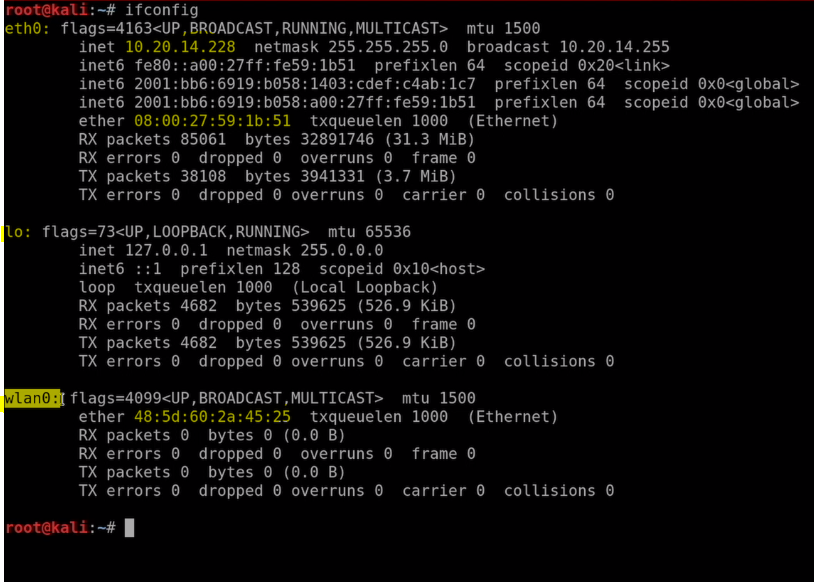
We can see that Kali lists all the network interfaces present in our system. So, we can conclude that a network interface is a device that helps us to connect to the network. Some examples of network interfaces are Wi-Fi cards, ethernet cables, etc.
Understand your network interface information.
Kali has listed all the information about each network interface.
eth0: This is the network interface that was set up by the virtual box when we were installing it on Windows. This is the NAT network and the virtual box considers this network as a wired connection between your Windows computer and your virtual box.
lo: This network interface is the default network interface that was set up by Kali Linux during its installation.
wlan0: This is the Wi-Fi adapter that I connected in Kali externally. It is not necessary that it show wlan0 even in your system. It may be mon0, wlan1, etc. depending on multiple factors.
NOTE:
Please note that if you have not connected any external Wireless adapter in Kali then you will only see eth0 and lo. Also, you will be needing a wireless adapter to continue with the next section, so please purchase a Wi-Fi adapter that supports monitor mode and packet injection.
The “inet” AND “ether”:
inet: This is the IP address of the network interface. Each device that is connected to a network has a unique IP address. As you can see that ether has an IP address i.e., 10.20.14.228 and lo also has an IP address i.e. 127.0.0.1, but wlan0 does not have any IP address because it is not connected to any network currently. If we will connect wlan0 to let’s say our home network, then a unique IP address will be assigned to it.
· ether: ether contains the value of the MAC address of the network interface. Since the MAC address is physically assigned by the manufacturer, hence every network interface has a MAC address regardless of its connection with a network.
But why does lo does not have a MAC address?
The answer to this is simple: Since lo is not associated with a hardware network interface (it is virtual) hence it does not have a MAC address. Communication through the loopback interface is not MAC-based hence no routing needs to take place to send packets between NICs.
Commands to change MAC address.
Finally, after all the theoretical knowledge we will do something practical. We will change the MAC address of the wlan0 interface.
Step-1: First we will need to disable the network interface. To disable the network interface, enter the following command.
ifconfig [your network adapter name] down
eg: ifconfig wlan0 down
Step-2: To change your MAC address enter the following command.
ifconfig [your network adapter name] hw ether [desired MAC address]
eg: ifconfig wlan0 hw ether 00:11:22:33:44:55.
Step-3: Finally, we need to enable the network interface. To enable the network interface, enter the following command.
ifconfig [your network interface name] up
eg: ifconfig wlan0 up

NOTE: Please note that since the MAC address is a physical address, we cannot change it permanently. Once you restart the Kali Linux the MAC address will revert to the original MAC address which was assigned by the manufacturer.
FIX COMMON ISSUES:
After some time if you see that your MAC address reverts to the original MAC address without restarting the O.S. then do the following:
Step-1: Enter the following command in the terminal:
leafpad /etc/NetworkManager/NetworkManager.conf
Step-2: Paste the following code in the configuration file without deleting any contents of the file:
[device]
wifi.scan-rand-mac-address=no
[connection]
ethernet.cloned-mac-address=preserve wifi.cloned-mac-address=preserve
The final code should look something like this:

Step-3: Close the leafpad.
CONCLUSION
In this blog, we discussed how we can change the MAC address of our network adapter in Kali Linux. This blog is related to the previous blog in which we discussed all MAC addresses and their use with real-life examples. To read the previous blog click here.
In the next blog, we will start the pre-connection attacks section and learn many cool kinds of stuff.
See you in the next one.
HAPPY HACKING :)


Comments